Why atbridge.ai?
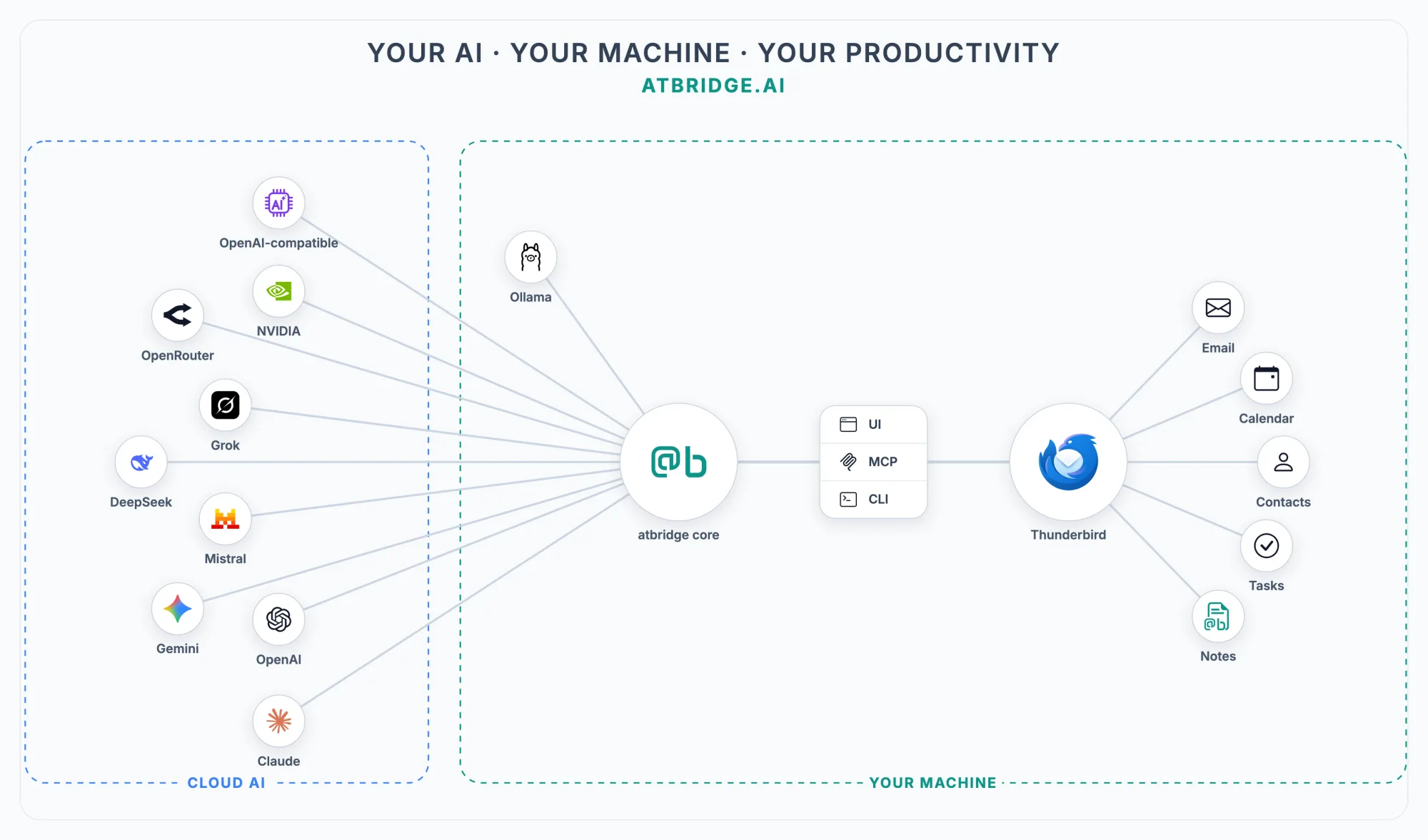
atbridge is an AI-native productivity suite for Thunderbird — manage your mail, calendar, contacts, notes, and tasks as one, with the AI you choose and the way you work (Thunderbird, MCP, or the CLI). No vendor lock-in; everything runs on your own machine.
See atbridge.ai in action:
You already use Thunderbird. You’d like to use AI more.
Section titled “You already use Thunderbird. You’d like to use AI more.”But moving between Thunderbird, ChatGPT, and a draft document is tedious. You copy a message in, paste a reply back. You ask AI for a nice HTML email and you get unstyled text. You can’t search your own inbox from your AI.
atbridge.ai fixes that.
What you get
Section titled “What you get”- Beautiful sends. Ask your AI for a customer update; receive a fully styled HTML email with your brand colours, fonts, and logo open in Thunderbird ready to review. No design step.
- Inbox triage. Tell your AI “sort the last 48 hours”. Get a ranked action list, with drafts already written for what needs a reply.
- Real search. “Find me everything from Example Corp about Q2.” Your AI reads the matching threads and summarises — without you opening any of them yourself.
- Multi-account. Personal and work Thunderbird accounts in one place. Your AI knows which identity to send from.
It works with Claude Desktop, Cursor, and any other AI assistant that supports tools — your favourite stays your favourite.
What it does NOT do
Section titled “What it does NOT do”- It does not send anything you didn’t approve. AI proposes; you click send. Drafts open in your normal Thunderbird compose window.
- It does not move your mail to the cloud. atbridge.ai runs entirely on your machine.
- It does not need a separate AI account. You bring your own — Claude, ChatGPT (via Cursor), or any other.
Who it’s for
Section titled “Who it’s for”- You spend more than an hour a day in Thunderbird and you’d rather spend less.
- You send branded customer or team emails and you’re tired of fighting Gmail’s compose box (you switched to Thunderbird for a reason).
- You want your AI assistant to actually be useful with email, not just summarise what you paste in.
How privacy works
Section titled “How privacy works”atbridge.ai runs locally — your mail is never routed through our servers. The only thing we see on our servers is your plan check — your email address and a check that your subscription is current. We never see the contents of any message.
Your AI is your choice: with a local model (Ollama) your email content never goes to any AI provider; with a cloud model (Claude, OpenAI…) only what you ask it to act on goes to the provider you picked — with your key, directly. (And, as with any email, sending still uses your own mail server.)
Try it
Section titled “Try it”Was this page helpful?
Thanks for the feedback!